

Table of Contents
In the ever-evolving landscape of project management tools, ClickUp has emerged as a game-changer. This article will delve into everything you need to know about ClickUp, from its extensive features to its pricing plans, and ultimately help you decide if it’s the right tool for you.
What is ClickUp? Understanding the All-in-One Workspace
ClickUp is a cloud-based productivity platform designed to streamline project management and enhance team collaboration. Unlike traditional tools that focus on a single function, ClickUp integrates tasks, docs, goals, and reports into a unified workspace. This holistic approach caters to teams of any size and industry, allowing for improved organization and productivity.
The intuitive interface makes it accessible to newcomers while offering advanced functionalities for seasoned project managers. By consolidating various project management elements, ClickUp minimizes the need for multiple tools.
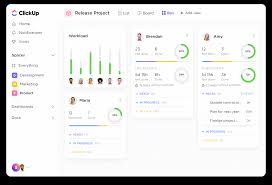
Core Features and Capabilities: What Makes ClickUp Stand Out
The standout features of ClickUp include:
- Tasks and Assignments: Easily create, assign, and track tasks from start to finish.
- Customizable Workflows: Tailor your workflows according to your team’s unique processes.
- Multiple Views: Choose between list, board, calendar, and Gantt views for optimal project visualization.
These core capabilities ensure that ClickUp is not just another project management tool; it is a comprehensive solution for any project-related needs.
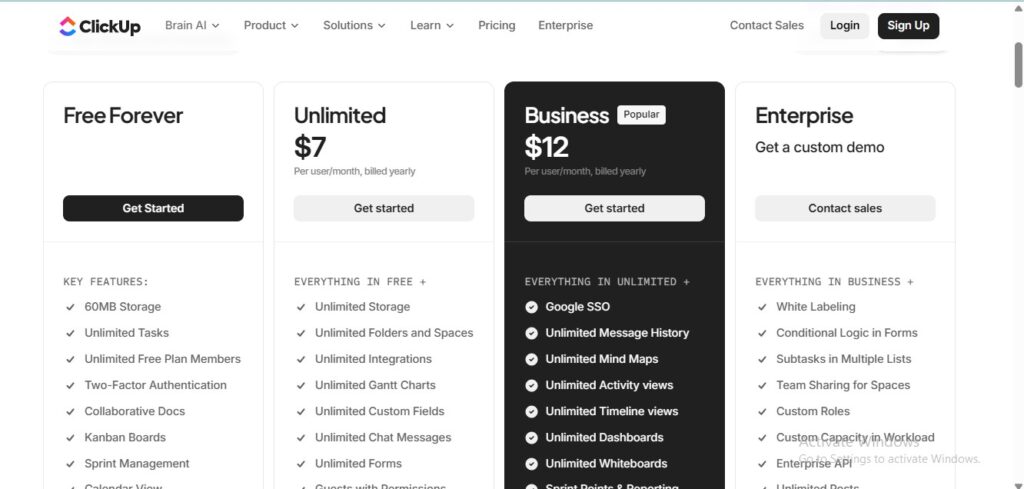
ClickUp Pricing Plans: Free Forever to Enterprise
ClickUp offers various pricing plans to suit different needs:
- Free Forever: Ideal for individuals or small teams, providing essential features without any cost.
- Unlimited: At $5 per user per month, it unlocks advanced features for growing teams.
- Business: Priced at $12 per user per month, it includes features for larger teams and integrations.
- Enterprise: Custom pricing tailored for larger organizations needing robust security and compliance features.
The pricing flexibility allows organizations to scale their usage based on growth and needs.
ClickUp Brain: AI-Powered Project Management in Action
With its innovative ClickUp Brain, users can leverage artificial intelligence to enhance productivity. This feature automates repetitive tasks, suggests optimizations, and provides insights based on project data.
ClickUp Brain uses machine learning algorithms to analyze workflows, ultimately reducing the time spent on manual tasks and enabling teams to focus on more strategic objectives.
Task Management and Multiple Views: Flexibility for Every Workflow
ClickUp excels in task management by offering a range of views to suit different preferences. Users can switch between:
- List View: For a straightforward, linear task organization.
- Board View: Ideal for teams familiar with Kanban-style project management.
- Calendar View: Perfect for time-sensitive projects and deadlines.
- Gantt View: Helps visualize project timelines and dependencies.
This flexibility enables teams to manage assignments in a way that suits their workflow best.
Collaboration Features: Docs, Chat, Whiteboards, and Real-Time Communication
Effective collaboration is a hallmark of ClickUp. The platform integrates various tools, including:
- Docs: Create and share documents directly within the platform.
- Chat: Foster real-time communication between team members.
- Whiteboards: Brainstorm ideas visually in a collaborative digital space.
These features make ClickUp not just a project management tool but a full-fledged collaboration platform.
Automation and Workflow Optimization in ClickUp
Automation capabilities in ClickUp allow teams to streamline repetitive tasks. Users can create automated workflows that trigger actions based on specific conditions, such as moving a task to the next stage once it is marked as complete.
This level of customization not only saves time but also enhances team productivity by reducing the manual workload.
Time Tracking and Resource Management
Time tracking is a vital feature for project management, and ClickUp offers robust time management tools. Users can log hours spent on tasks, analyze team productivity, and allocate resources effectively, ensuring projects stay within budget and on schedule.
This capability is crucial for teams that require detailed reporting and analysis of time investment.
Dashboards and Reporting: Real-Time Project Insights
With customizable dashboards, ClickUp allows teams to visualize project metrics in real-time. This feature enables users to see key performance indicators, deadlines, and tasks at a glance, facilitating quick decision-making.
In addition to dashboards, detailed reports can be generated to analyze past performance, helping teams learn and adapt for future projects.
ClickUp vs Asana: Which Project Management Tool is Right for You?
When comparing ClickUp to Asana, both offer powerful project management capabilities but cater to different needs.
ClickUp provides all-in-one features including docs and goals, whereas Asana focuses heavily on task management. If you require a versatile solution with extensive functionalities, ClickUp is likely the better choice.
ClickUp vs Monday.com: Feature Comparison and Performance
Monday.com is another popular project management tool. While it excels in visual project tracking, ClickUp offers more varied functionalities, including document sharing and AI integration.
Teams looking for a comprehensive platform that includes advanced project management features should consider ClickUp.
ClickUp vs Trello: From Simple Boards to Advanced Project Management
Trello is best known for its simplicity and board-style management, whereas ClickUp provides an advanced suite of tools suited for complex project needs.
If you need flexibility and scalability, ClickUp is a preferred solution, while Trello is fit for those seeking a straightforward, uncomplicated tool.
Integrations and API Access: Connecting Your Tech Stack
ClickUp supports a range of integrations with tools like Slack, Google Drive, and Zoom, enabling teams to connect their existing tech stack seamlessly. The robust API also allows for custom integrations, making it easier for organizations to tailor the platform to their specific needs.
This compatibility ensures that ClickUp can fit neatly into various workflows, enhancing overall productivity.
The Learning Curve: Setting Up and Onboarding Your Team
Getting started with ClickUp involves a straightforward sign-up process. New users can create an account seamlessly through the website or the mobile app.
After creating an account, the onboarding wizard guides users through key features, ensuring teams can hit the ground running.
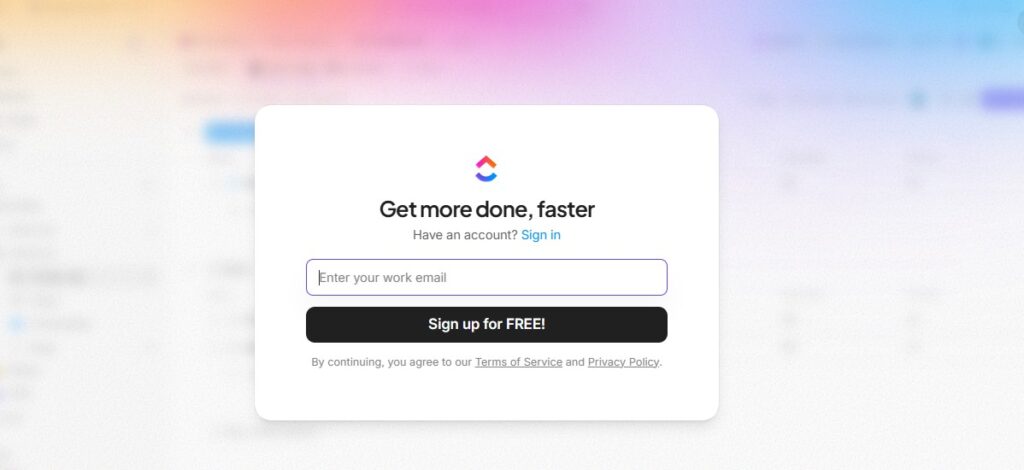
To sign up for ClickUp, follow these steps:
- Visit the ClickUp website.
- Click on Sign Up.
- Enter your email and create a password.
- Follow the onboarding prompts to set up your workspace.
The simplicity of the onboarding process makes it easy for teams to adopt from the outset.
Who Should Use ClickUp? Ideal Teams and Use Cases
ClickUp is versatile enough for small startups to large enterprises. Ideal users include:
- Project managers looking for comprehensive project oversight.
- Marketing teams needing robust collaboration tools.
- Software development teams requiring detailed task and resource management.
Regardless of the industry, ClickUp adapts to meet various project management needs.
ClickUp Pros and Cons: An Honest Assessment
Pros:
- All-in-one project management features.
- Highly customizable workflows.
- Flexible pricing plans.
Cons:
- Initial complexity for new users.
- Some features may be overwhelming for simpler tasks.
Before committing to ClickUp, it’s important to weigh these pros and cons based on the unique needs of your team.
Mobile App Experience: ClickUp On-the-Go
ClickUp offers a mobile app that allows you to manage tasks and communicate with your team while on the go. The app features a user-friendly interface and access to core functionalities, making it easier to stay productive, even away from your desk.
This mobility ensures that team members can collaborate seamlessly regardless of location.
Security and Compliance Features for Enterprise Teams
For larger organizations, security and compliance are paramount. ClickUp provides enterprise-level security features, including data encryption and compliance with industry standards such as GDPR.
These measures ensure that sensitive company data remains secure, making ClickUp a reliable choice for businesses with rigorous security requirements.
Customer Support and Learning Resources
ClickUp offers extensive customer support options, including a knowledge base, tutorials, and an active community forum. When teams encounter issues or have questions, they can easily find resources or reach out for assistance.
The availability of learning materials makes it easier for teams to utilize all features effectively.
Is ClickUp Worth It? Final Verdict and Recommendations
After exploring the numerous features, pricing options, and integration capabilities, it’s clear that ClickUp offers a robust solution for project management. Its adaptability, comprehensive functionalities, and user-friendly interface make it a worthwhile investment for teams of all sizes.
If you need a tool that grows with your team and integrates various features into one platform, ClickUp is highly recommended.
Conclusion
In a crowded field of project management tools, ClickUp stands out as a versatile and powerful solution. Whether you’re an individual freelancer or part of an enterprise team, ClickUp can streamline your workflow and enhance productivity.
By adopting this all-in-one workspace, you unlock a myriad of features that can transform the way your team collaborates and executes projects.
FAQs
What is ClickUp?
ClickUp is a comprehensive project management tool that integrates tasks, docs, and collaboration features into a single platform.
How much does ClickUp cost?
ClickUp offers a free plan and several paid options starting at $5 per user per month.
Is ClickUp suitable for small teams?
Yes, ClickUp is designed to accommodate teams ranging from small startups to large enterprises.
Can you automate tasks in ClickUp?
Absolutely, ClickUp includes powerful automation features to streamline workflows.
Does ClickUp have a mobile app?
Yes, ClickUp offers a mobile app that provides access to project management tools on the go.



Pingback: How Iconosquare Transforms Social Media Management: Features, Pricing & Expert Review - softdatacore