

Table of Contents
Introduction to FreshBooks: What You Need to Know
In the dynamic landscape of small business operations, having a robust accounting solution is paramount. Enter FreshBooks, a cloud-based accounting software designed explicitly for small businesses and freelancers. Its primary purpose is to streamline accounting processes, simplify financial management, and allow business owners to focus on what they do best: running their companies.
With the rise of the gig economy and an increasing number of professionals opting for freelance work, the demand for specialized accounting solutions has never been higher. FreshBooks stands out not just as an accounting tool; it embodies a philosophy centered around simplifying the financial aspects of running a business. This article aims to delve deep into how FreshBooks serves as an indispensable tool, empowering small businesses to thrive in a competitive market.
Key Features of FreshBooks: A Deep Dive
Detailed Examination of Features Such as Invoicing, Expense Tracking, and More
FreshBooks comes with a suite of powerful features tailored to meet the diverse needs of small businesses. Here are some key functionalities that set it apart:
Invoicing
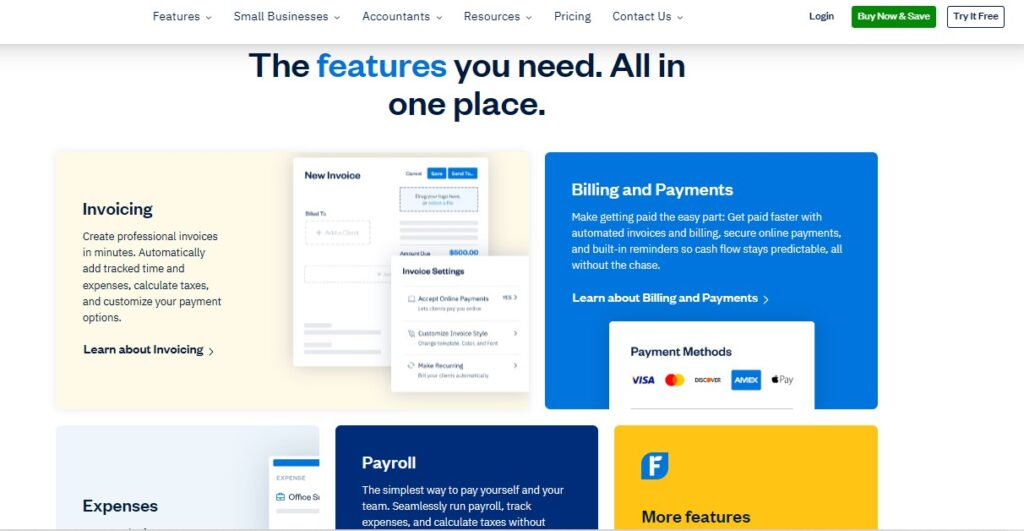
Creating professional invoices has never been easier. FreshBooks allows users to generate invoices in just a few clicks, ensuring that billing is both quick and accurate. Features include:
- Customizable Templates: Users can opt for various stylish templates that reflect their branding.
- Tracking Time and Expenses: Automatically add tracked hours and expenses to invoices to guarantee that no billable hours slip through the cracks.
- Recurring Invoices: For businesses with regular clients, setting up recurring invoices saves time and keeps cash flow steady.
Expense Tracking
Managing expenses can be a daunting task, especially for small businesses trying to maintain their financial health. FreshBooks simplifies this through:
- Mobile Receipt Scanning: Users can snap pictures of their receipts and upload them directly into the platform, enabling hassle-free expense tracking.
- Automated Categorization: The ability to categorize expenses automatically allows business owners to see where their money is going in real time, easing the burden during tax season.
Time Tracking
For small businesses, understanding how time is spent is crucial, especially for those that bill clients by the hour. FreshBooks provides tools to:
- Log Hours Worked: Users can easily enter hours worked on specific projects or for particular clients, streamlining the billing process.
- Project Tracking: Monitor time spent on various projects to better understand profitability and productivity.
Reporting
FreshBooks offers essential reporting capabilities, providing insights into business performance. Key reports include:
- Profit and Loss Statements: Users can easily generate profit and loss statements to gauge financial health.
- Sales Reports: Understanding sales trends is vital for making informed decisions, and these reports help determine which services or products are most profitable.
- Expense Reports: Track spending habits and identify areas for potential cuts or efficiencies.
Further Features
Beyond the essentials, FreshBooks includes additional tools like:
- Credit Card Processing: Accept credit card payments directly through invoices for faster cash flow.
- Client Portal: Clients can access their invoices and payment history, ensuring transparency and ease of communication.
- Estimates and Proposals: Create estimates and proposals that can be sent to clients before work begins, setting clear expectations from the outset.
By encompassing these core functionalities, FreshBooks positions itself not just as a tool for tracking numbers but as a comprehensive solution for managing every aspect of small business accounting.
FreshBooks for Small Businesses: Empowering Entrepreneurs
How FreshBooks Caters Specifically to the Needs of Small Businesses
FreshBooks was designed with the everyday entrepreneur in mind. It empowers small business owners by:
Simplifying Account Management
The platform offers an intuitive interface that eliminates the steep learning curve associated with traditional accounting software. Entrepreneurs can avoid being bogged down by financial complexities and instead focus on their core business functions.
Supporting Cash Flow Management
One of the primary concerns for small businesses is ensuring stable cash flow. FreshBooks addresses this frequently with features that assist users in:
- Automated Invoicing: Sending out invoices quickly and regularly ensures timely payments.
- Payment Reminders: Built-in reminders help notify clients about outstanding invoices, reducing the likelihood of late payments.
In essence, FreshBooks acts as a support system that helps small business owners effectively manage their cash flow without the need for a dedicated accounting team.
Providing Scalability
As small businesses grow, their accounting needs often become more complex. FreshBooks can adapt to accommodate this growth by offering various pricing plans that cater to businesses of different sizes and stages. Users can start with basic features and gradually upgrade to include advanced functionalities such as team collaboration and more robust reporting tools.
Invoicing Made Simple: Streamlining Billing Processes with FreshBooks
Discussing the Accuracy and Ease of Creating Professional Invoices
Effective invoicing is crucial for maintaining healthy cash flow and ensuring that clients are billed correctly. FreshBooks simplifies this process. Here’s how:
Quick Invoice Creation
Users can create and send tailored invoices in just a few clicks. The platform supports:
- Multiple Payment Options: Clients can pay using credit cards, debit cards, or ACH transfers directly on the invoice, providing convenience and flexibility.
- Custom Fields: Business owners can include specific information, like a purchase order number or unique client references.
Recurrences and Automation
With recurring invoices, businesses can set them up once and let FreshBooks handle the rest. This feature is ideal for service-based businesses that work with clients on ongoing contracts.
Automated Payments: Enhancing Cash Flow with FreshBooks
Exploring Billing and Payments Features to Ensure Timely Collections
Cash flow is the lifeblood of any business, and FreshBooks provides tools specifically designed to enhance financial liquidity:
Secure Online Payments
The ability to accept credit card payments directly through invoices reduces friction in the payment process. Clients appreciate the ease of paying from anywhere, leading to faster payments and fewer delays in cash collection.
Payment Reminders
FreshBooks takes the hassle out of following up with clients by sending automated reminders about unpaid invoices. Business owners can focus on their operations, knowing that their billing process is being handled.
Insights into Cash Flow
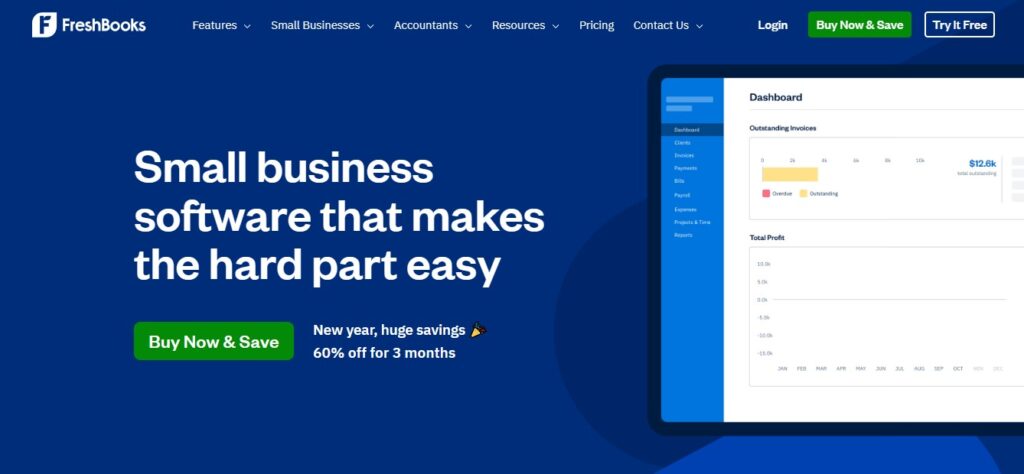
The Dashboard view provides insights into accounts receivable, outstanding invoices, and money that’s coming in, giving users a clear picture of their financial standing.
Expense Management: Tracking Your Business Finances
Utilizing Mobile Receipt Scanning and Automated Categorization
For every business, maintaining an accurate record of expenses is crucial for both budgeting and tax purposes. FreshBooks makes this process seamless:
Mobile Receipt Scanning
Users can utilize their smartphones to capture receipts immediately, ensuring that expenses are documented in real-time. This feature helps eliminate the dreaded “shoebox of receipts” scenario where records get lost.
Automated Categorization
FreshBooks uses smart technology to automatically categorize expenses, allowing business owners to visualize their spending without getting bogged down by manual entry.
Performance and Accountability
With all expenses tracked and organized, it becomes easier for small business owners to identify areas where they can cut costs, thus improving profitability.
Payroll Solutions: Simplifying Employee Payment
How FreshBooks Helps Businesses Manage Payroll Efficiently
For small business owners, payroll often represents one of the most significant ongoing costs. FreshBooks simplifies payroll management significantly:
Seamless Payroll Processing
The software allows businesses to process payroll directly, doing away with the need for third-party payroll services. With a few quick inputs, business owners can manage:
- Employee Payments: Calculate wages, bonuses, and deductions accurately, ensuring compliance with tax regulations.
- Tax Compliance: FreshBooks helps users calculate the necessary withholdings, alleviating the concern of managing complex payroll taxes.
Reporting and Documentation
With built-in reporting capabilities for payroll, businesses can easily view payroll expenses and prepare for tax filing with less hassle.

FreshBooks vs. Traditional Accounting Software: A Comparative Analysis
Highlighting the Advantages of FreshBooks Over Competitors Like QuickBooks
When considering an accounting solution, many small businesses compare FreshBooks to traditional platforms like QuickBooks. Here are some advantages that FreshBooks holds:
Focus on User Experience
Unlike many traditional accounting software options that can be complex and cumbersome, FreshBooks emphasizes user-friendliness. The dashboard is designed for ease of navigation, with features laid out in an intuitive manner.
Specificity for Small Businesses
FreshBooks is tailored specifically for small businesses and freelancers, offering features that align precisely with their needs. Traditional platforms are often overloaded with features that, while powerful, can overwhelm users who don’t require that level of complexity.
Real-Time Support
FreshBooks tends to provide quicker, responsive support tailored to small business inquiries, whereas larger, traditional accounting software companies might have lengthy wait times for customer service.
Integrating FreshBooks with Other Applications: Expanding Functionality
Discussing the FreshBooks AppStore and Integration Capabilities
One of FreshBooks‘s strengths is its ability to integrate seamlessly with other applications:
Leveraging the FreshBooks AppStore
FreshBooks has an extensive AppStore that allows users to connect with over 100 popular applications, including:
- Payment Processors: Integrate with Stripe, PayPal, or Square for easy payment processing.
- Project Management Tools: Link with Trello or Asana to streamline project tracking alongside financial management.
These integrations foster a connected ecosystem that can enhance productivity, ultimately improving business efficiency.
API Capabilities
For those with technical expertise, FreshBooks offers an API for creating custom integrations. This is particularly useful for larger businesses with specific workflow needs or platforms that require unique functionalities.
User Experience: Interface and Ease of Use
Evaluating User-Friendliness and Accessibility Across Devices
Good software is only as useful as its usability. FreshBooks has made significant strides in ensuring that its platform is accessible and easy to use, regardless of a user’s technological proficiency:
Mobile and Desktop Accessibility
FreshBooks is accessible on multiple devices, from desktops to smartphones. Users can manage their finances on the go, giving them the freedom to work wherever they may be.
Training and Resources
New users will appreciate the abundance of resources FreshBooks offers, including how-to articles, webinars, and video tutorials. This extensive support network ensures that even the less tech-savvy users can get onboard quickly.
Customer Support: Exceptional Assistance When You Need It
Overview of Support Options and Satisfaction Ratings
Customer support can make or break an accounting software experience. FreshBooks has a robust support system in place:
Multiple Support Channels
Users can reach out to support via:
- Email: For less urgent inquiries.
- Phone Support: For more immediate concerns or complex issues.
- Live Chat: Get instant answers to questions without having to navigate IVR systems.
High Customer Satisfaction
With a satisfaction rating of 4.8 out of 5 based on user reviews, FreshBooks demonstrates its commitment to customer service. Satisfied customers frequently report quick resolutions to their problems, contributing to a positive overall experience.
Pricing Plans: Which FreshBooks Option is Right for You?
Breakdown of Pricing Tiers and Features Included in Each
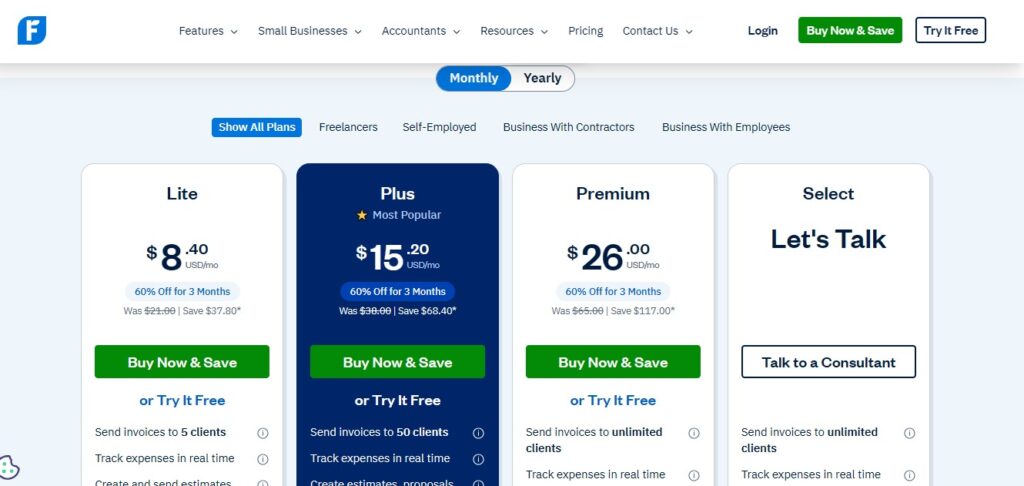
Understanding the pricing structure is essential for any potential user. FreshBooks offers a variety of plans tailored to different needs and budgets:
Starter Plan
- Ideal for: Freelancers or solopreneurs.
- Features: Basic invoicing, expense tracking, and time tracking for a limited number of clients.
Plus Plan
- Ideal for: Small teams or growing businesses.
- Features: Includes everything in the Starter Plan, plus the ability to manage multiple clients, enhanced reporting features, and more support options.
Premium Plan
- Ideal for: Larger businesses needing extensive functionality.
- Features: Comprehensive reporting, advanced expense tracking, multi-currency support, and more.
By offering tiered pricing, FreshBooks accommodates users at various stages in their business journey, making it a flexible choice for many.
Frequently Asked Questions About FreshBooks
1. What do I get in my 30-day free trial of FreshBooks?
You receive full access to all features during your free trial period, allowing you to explore how FreshBooks can benefit your business.
2. Which FreshBooks plan is right for me?
Choosing the right plan depends on your business size and needs; the Starter plan is great for individuals, while larger businesses may prefer the Premium plan for its extensive features.
3. How does FreshBooks work?
FreshBooks automates and simplifies everyday accounting tasks, including invoicing, expense tracking, and payroll management, making it accessible for non-accounting professionals.
4. Does FreshBooks work on all of my devices?
Yes, FreshBooks is a cloud-based solution that can be accessed from any device with an internet connection, including mobile phones and tablets.
5. Can FreshBooks help me transfer my data?
Yes, FreshBooks offers support to assist with transferring data from previous systems, making the transition smooth.
Real-World Success Stories: How Businesses Thrive with FreshBooks
Case Studies Showcasing User Experiences and Benefits
Numerous small businesses have successfully leveraged FreshBooks to enhance their operations. Here are some real-world examples:
Freelancers Finding Efficiency
Freelance designers and consultants often report saved hours by using FreshBooks for:
- Automated Invoicing and Time Tracking: They can focus more on creative work rather than administrative tasks.
- Organized Finances: With all invoices and expenses centralized, they find it easier to manage their finances.
Small Business Owners Driving Growth
Larger businesses have reported a significant increase in productivity after adopting FreshBooks:
- Improved Team Collaboration: By using the multi-user features, teams can work together more efficiently, which is essential for client services.
- Comprehensive Reporting: Business owners use the insights provided by FreshBooks to make informed decisions that drive growth.
These testimonials illuminate the transformative impact FreshBooks can have on daily operations, enhancing efficiency, profitability, and overall user experience.
The Importance of Time Tracking: Boosting Productivity
Discussing the Time Tracking Features and Their Impact on Efficiency
Time tracking is particularly important for service-based businesses, and FreshBooks excels in this area:
Project-Based Time Tracking
Business owners can log hours worked on specific projects, ensuring accurate billing for clients. This is a crucial feature that enables businesses to:
- Monitor Profits: Understanding the time invested in projects allows businesses to evaluate their profitability accurately.
- Identify Resource Allocation: By tracking where time is spent, businesses can better allocate resources to profitable projects.
Improved Productivity
The insights provided by time tracking serve as a valuable tool for productivity enhancement:
- Identify Time Wasters: By analyzing where time is spent, users can pinpoint inefficiencies and make necessary adjustments.
- Balance Workloads: Proper time tracking contributes to staff accountability and helps prevent burnout by ensuring workloads are managed effectively.
Mobile Capabilities: Managing Your Business on the Go
Exploring the Functionality of the FreshBooks Mobile App
The FreshBooks mobile app is an invaluable resource for small business owners, enabling them to manage their finances on the go:
Invoicing on the Go
Users can create and send invoices directly from their mobile devices, ensuring that clients can be billed as soon as a service is rendered. This feature is crucial for businesses in service industries, where timely invoicing can significantly affect cash flow.
Expense Tracking with Ease
With mobile receipt scanning, business owners can photograph receipts instantly and categorize them, keeping financial management efficient even when away from the office.
Security Features: Protecting Your Financial Data
Analyzing FreshBooks’ Data Protection Measures and Privacy Policies
In today’s digital era, security is a top priority. FreshBooks ensures that users’ financial data is protected through the following measures:
Robust Data Encryption
All sensitive information is secured using industry-standard encryption protocols, safeguarding against unauthorized access and data breaches. This level of protection is crucial for maintaining user trust.
Compliance with Privacy Regulations
FreshBooks adheres to current privacy laws and regulations, ensuring that user information is well-protected and handled with care. By building trust through transparency and responsible data handling, FreshBooks ensures that users can focus on their business rather than worry about security issues.
Future Trends: The Evolution of Accounting Software
Insights into How FreshBooks Plans to Adapt to Changing Business Landscapes
The field of accounting software is constantly evolving, and FreshBooks is committed to staying ahead of the curve:
Incorporating AI and Automation
Upcoming features are likely to include enhanced AI capabilities that automate more processes, such as predicting cash flow trends and optimizing invoicing timelines, allowing users to make proactive decisions.
Adapting to User Feedback
FreshBooks regularly gathers user feedback to refine its offerings. This agility in responding to user needs ensures that FreshBooks not only meet current demands but also anticipates future requirements in the rapidly changing world of small business.
Getting Started: A Beginner’s Guide to FreshBooks
Step-by-Step Instructions on Signing Up and Setting Up FreshBooks
Getting started with FreshBooks is a straightforward process, ideal for businesses eager to elevate their accounting experience:
Step 1: Sign Up
Visit the official FreshBooks website and click on “Try It Free.” You’ll be prompted to create an account by providing your email address and choosing a password.
Step 2: Setup Your Account
Upon signing up, you’ll go through a guided setup process. Here, you will:
- Enter your business details (name, type, etc.).
- Set up your financial settings (currency, tax rates, etc.).
Step 3: Customize Your Dashboard
Tailor your dashboard to highlight features that matter most to you, such as invoicing, expenses, or project management.
Step 4: Integrate Your Accounts
To fully utilize FreshBooks, connect your bank accounts and payment processors. Automated synchronization makes tracking finances easier and more accurate.
Step 5: Start Using FreshBooks
Begin creating invoices, tracking expenses, and managing payroll. Familiarize yourself with the available features and resources.
Conclusion: Why FreshBooks is Essential for Modern Small Businesses
In conclusion, FreshBooks stands out as an indispensable tool for small businesses seeking to streamline their financial processes. Its user-friendly interface, comprehensive range of features, and exceptional customer support make it an ideal choice for entrepreneurs. By focusing on core functionalities such as invoicing, expense management, and cash flow tracking, FreshBooks enables business owners to manage their finances effectively.
The insights gained from real-world success stories reinforce the value of FreshBooks as a platform that not only simplifies accounting tasks but also enhances overall business productivity and growth. Whether you’re a freelancer, a small business, or managing a team, FreshBooks opens the door to a world where financial management becomes a seamless part of your business operations.



Pingback: ClickUp Complete Guide: Features, Pricing, and Real-World Performance for Teams - softdatacore